
If you require any type of IT assistance, please reach out to us with an ECE IT Support Request. Your request will be routed to an appropriate system administrator.
IT staff


Links
- Azure for Education – Software Downloads
- Conference Room Reservation
- Create IT Support Ticket
- ECE Student Computing Lab Access and Information
- HWCOE-IT Onboarding Documentation
- Malachowsky Hall Airtable chair assignments
- Remote Access – Desktop Share
- UF Cloud Service Eligibility (Affiliation requirement for access)
- UF Email
- UF Dropbox
IT security roles
| Position | Person | Title |
|---|---|---|
| Dept Security Administrator (ISA) | José Fortes | Acting ECE Chair |
| Dept Security Manager (ISM) | Jason Kawaja | ECE IT Manager |
| College Security Administrator (ISA) | Mark Tehranipoor | ENG Dean |
| College Security Manager (ISM) | Shawn Lander | ENG IT Manager |
IT request workflow
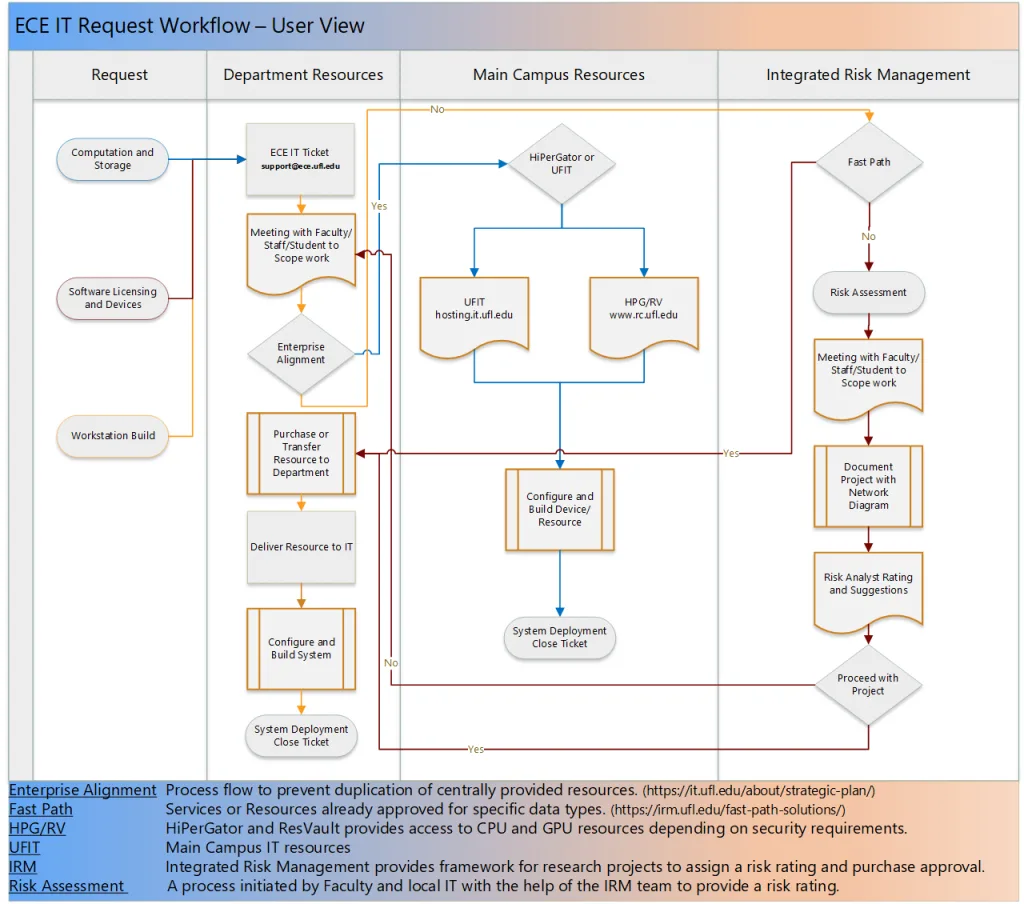
Flowchart description
Flowchart illustrating the ECE IT Request Workflow – User View. The process begins with a request for Department Resources, leading to either Main Campus Resources or Integrated Risk Management. If the request is for Computation and Storage or Software and Devices, it proceeds through Enterprise Alignment, then to Configure and Build Device/Resource. A ‘No’ path from System Deployment Close Ticket leads back to Configure and Build Resource. If a request involves a Meeting with Faculty/Staff/Student to Scope work, it progresses through Risk Assessment and then to Document Project with Risk Analysis Rating and Suggestions. Key elements include boxes labeled with process steps and diamond shapes indicating decision points (Yes/No). The chart contains text describing Enterprise Alignment, Fast Path, HPG/RV, UFIT, IRM, and Risk Assessment processes.